
4admin × Xplan Integration
Xplan
Build your Xplan records automatically without manual entry, with 4admin's Xplan integration.









Features
Feature Overview
01
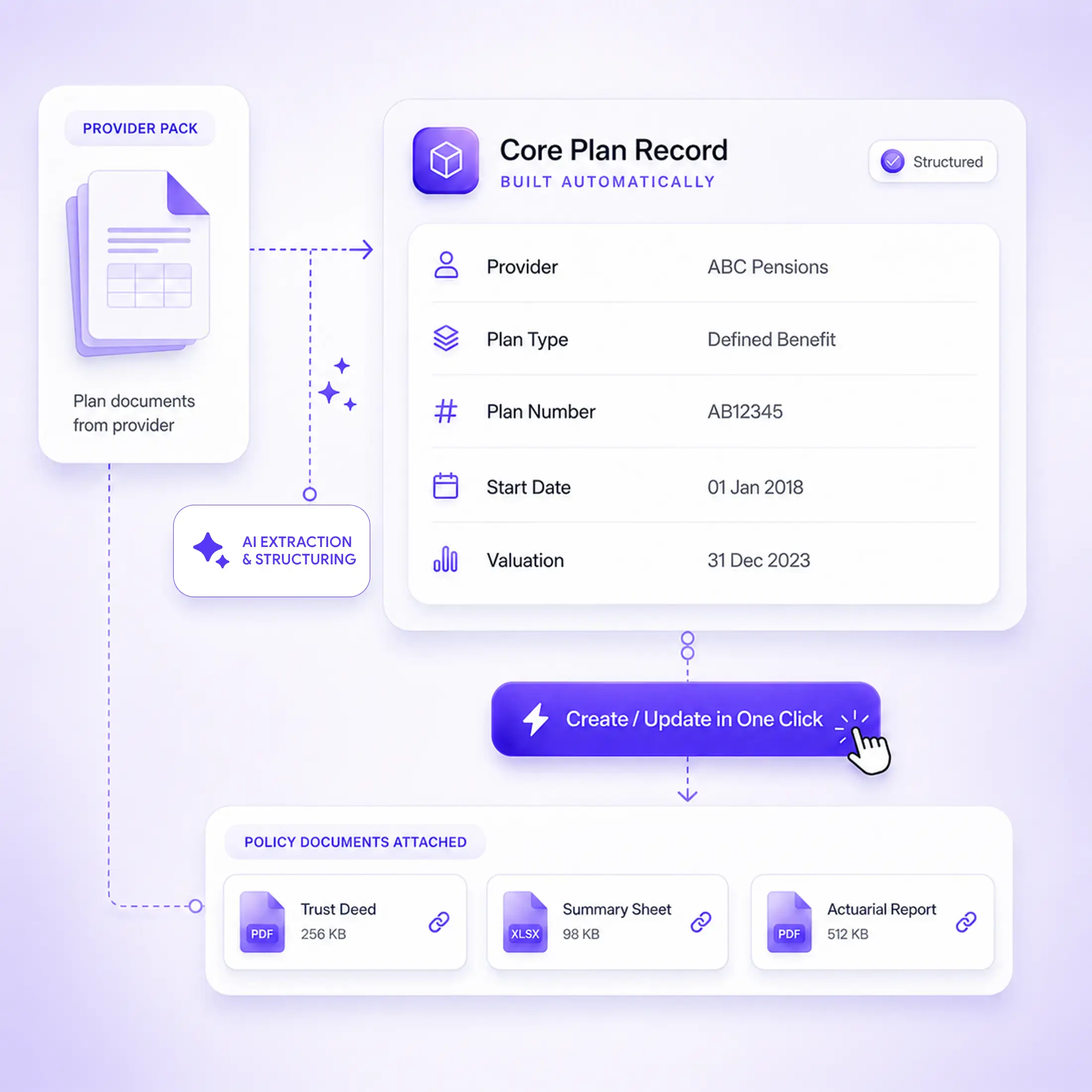
Core Plan Record Built Automatically
Core details such as the provider, plan type, plan number, start date and valuations move into Xplan without being copied from the pack by hand.
02
Create or Update Plans in One Click
Create a Plan builds a new record from the provider pack. Update a Plan adds the newly captured details to an existing one.
03
Policy Documents Attached
The original provider documents and 4admin's AI-populated summary sheet move across and stay attached to the Xplan record.
What Gets Pushed into Xplan
Once the LOA data is confirmed, 4admin uses Create a Plan or Update a Plan to build the record directly in Xplan.
Plan Details
Documents
Plan Details
Provider name
Plan type and plan number
Start date and current valuation
Documents
Policy documents
Product information and transaction history
Summary sheet built by 4admin's AI
Process Flow
From Signed LOA to Xplan Record
4admin takes the provider information through the LOA workflow, structures what comes back and gives your team a simple way to carry the confirmed details into Xplan.
Submit LOA
→
4admin Analyses the Pack
→
Confirm the Plan Data
→
Push to Xplan
Why 4admin & Xplan Integration Matters
Getting the provider pack back is only useful if the information makes it into the system your team relies on.
Rebuilding the Xplan Record by Hand
Without the integration, your team exports the information from 4admin and rebuilds the core Xplan record manually. Plan numbers, valuations and other details risk being mistyped during the handover, and the record is only as complete as the time available to build it.
A Smoother Route into Xplan
Core details such as the provider, plan type, plan number, start date and valuations move into Xplan without being copied from the pack by hand. The underlying policy documents and 4admin's AI-populated summary sheet move across alongside the plan information.
Security and Compliance
Permissions
The 4admin and Xplan integration supports the transfer of confirmed plan information and documents into Xplan as part of your firm's existing workflow.
Data Handling
Data is encrypted in transit and at rest, hosted on UK Microsoft Azure infrastructure.
Security Certifications
4admin holds SOC 2 Type II certification and is ISO 27001 certified. Full detail is available on our security page.
Explore More Integrations
Connect 4admin with other tools across your advice workflow and keep captured information moving without unnecessary manual data entry.
Built to your firm
Custom integrations
Every firm configures Xplan differently. If your team relies on specific tasks, threads or document notes, we build the integration around them rather than asking you to change how you work.
Workflow steps run when 4admin pushes a policy to Xplan: create a task for the adviser, write a 4admin field into the client record, file the supporting documents as a document note with the subject and type your firm uses. Where Xplan's API allows it, we can connect a trigger in 4admin to the action your process needs. Each build is scoped with your operations lead, so the automation matches how your firm already works.
Example workflows
Policy pushed to Xplan
→
Task created for the adviser
Provider data confirmed
→
Fields updated on the client record
Provider pack received
→
Document note filed against the client
What data does 4admin send into Xplan?
Provider name, plan type and plan number, start date and current valuation, along with the policy documents and the AI-generated summary sheet.
Can 4admin create a brand new plan in Xplan?
Yes. Create a Plan builds a new record from the data extracted out of the provider pack.
What if the plan already exists in Xplan?
Use Update a Plan instead. It adds the newly captured details to the existing record rather than duplicating it.
Do we still get the original provider documents?
Yes. They move across with the structured data and stay attached to the Xplan record.
Does this change how our team works in Xplan day to day?
No. Xplan stays your core system exactly as it is. 4admin just delivers finished data into it instead of someone typing it in.
Is this data reliable for a file check?
Yes. Every field written into Xplan traces back to the provider pack it came from.