
4admin × Selectapension Integration
Selectapension
Move plan data from 4admin into Selectapension. Set up your Pension Switching analysis faster with less manual re-keying.









Features
Feature Overview
01
Transfer Single or Multiple Plan Data
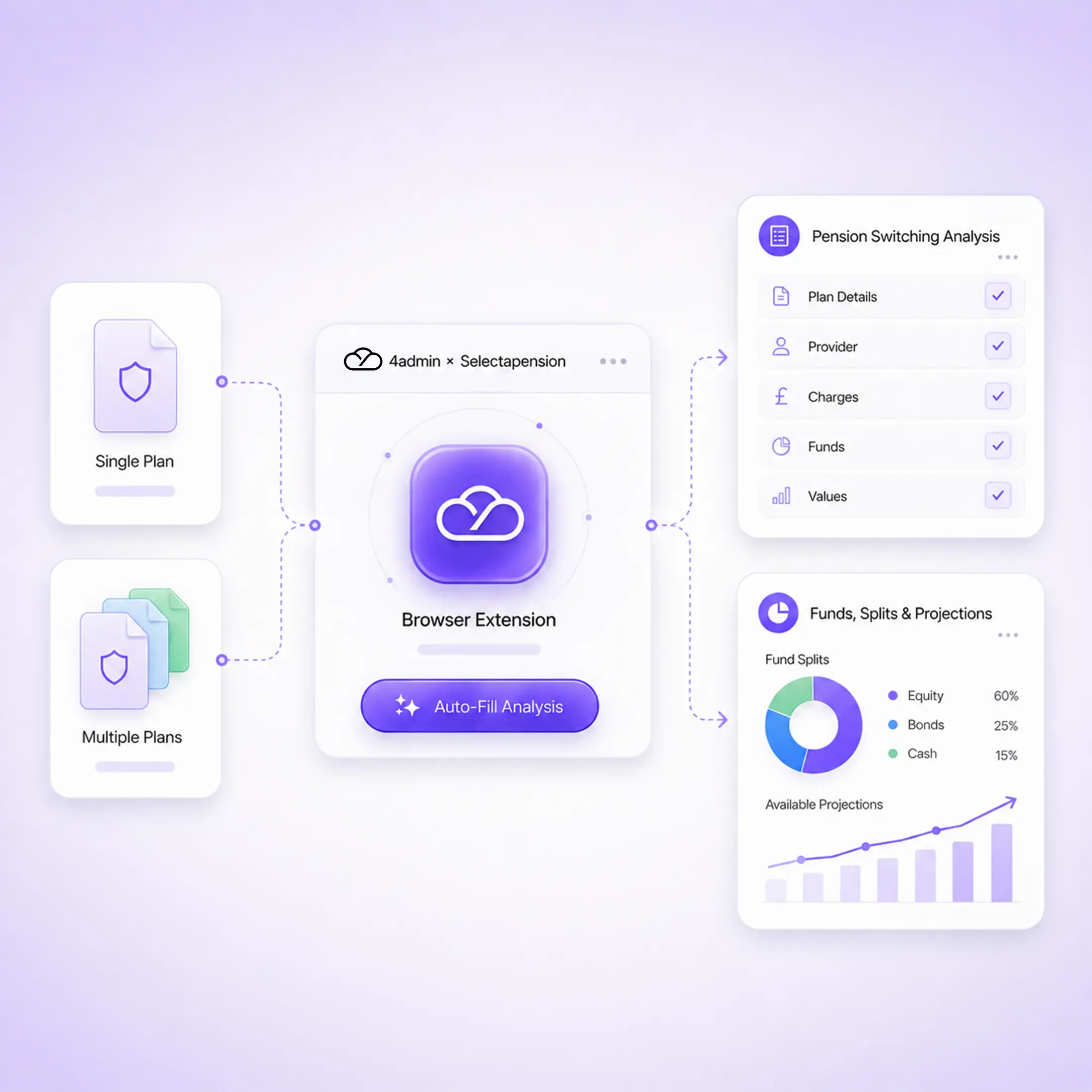
Extract data from a single pension plan in 4admin, or prepare multiple plans together using Compare Policies.
02
Auto-Fill Pension Switching Analysis
Fill available plan details into your Pension Switching analysis, with the relevant funds searched for and selected automatically.
03
Add Funds, Splits and Available Projections
Calculate fund allocation splits based on plan values and add provider projection rates when the information is available.
What This Integration Does
The 4admin × Selectapension browser extension carries pension plan information already available in 4admin into your Pension Switching analysis.
Plan Data
Funds
Projections
Plan Data
Extract data from a single pension plan
Prepare multiple plans using Compare Policies
Fill available plan details into the analysis
Funds
Search for and select the relevant funds
Calculate fund allocation splits from plan values
Add the funds to the analysis automatically
Projections
Add provider projection rates when available
Apply relevant life cover fields
Apply waiver of premium fields when identified
Process Flow
From 4admin to Pension Switching Analysis
Move from plan information in 4admin to a populated Pension Switching analysis in a simple, connected workflow.
Extract Plan Data in 4admin
→
Open Pension Switching Analysis
→
Choose Analysis Settings
→
Fill Plans with the Extension
→
Review and Continue
Why 4admin & Selectapension Integration Matters
When pension information is already available in 4admin, entering it again in Selectapension adds unnecessary admin. Connecting the two helps your team reuse that information and progress analysis with less manual work.
Entering Plan Information Twice
Without the integration, your team copies plan details, fund holdings, splits and projections out of 4admin and into Selectapension by hand before an analysis can begin. Every re-keyed field is extra admin and another chance for a manual entry error.
What You Get
Spend less time re-keying data, handle multi-plan cases more efficiently and reduce the risk of manual entry errors. Plan information stays more consistent, your team continues working in Selectapension, and you keep control of the final review.
Security and Compliance
Permissions
The extension requests permission to run on 4admin and Selectapension pages, so it can read plan data in 4admin and fill it into your Selectapension analysis.
Data Handling
Data is encrypted in transit and at rest, hosted on UK Microsoft Azure infrastructure.
Security Certifications
4admin holds SOC 2 Type II certification and is ISO 27001 certified. Full detail is available on our security page.
Explore More Integrations
4admin connects with the tools used across your advice workflow, helping information move from one stage to the next with less manual handling.
What does the 4admin and Selectapension integration do?
The browser extension takes pension plan data extracted in 4admin and uses it to populate a Pension Switching analysis in Selectapension. This reduces the amount of information that needs to be manually copied from one system into the other.
Can I transfer more than one pension plan?
Yes. You can extract data from a single policy in 4admin or use Compare Policies to prepare multiple plans for the same Selectapension analysis.
Does this integration replace how we use Selectapension?
No. You continue to create and run Pension Switching analysis in Selectapension. 4admin helps reduce the manual work involved in getting existing pension plan information into the analysis.
What information can the extension populate?
Depending on the information available in 4admin, the extension can populate pension plan details, find and add funds, calculate fund splits, enter available provider projections and identify fields such as life cover or waiver of premium.
What happens if provider projections are not available?
Where provider projection data is available and has been extracted by 4admin, it can be added to the analysis. Where it is not available, default projection rates may be used. These should be reviewed before the analysis is completed.
Do I still need to check the information after it has been populated?
Yes. The populated plans should be reviewed against the information held in 4admin. Projection figures and the charges associated with them are particularly important to double-check before continuing.