
4admin × Intelliflo Integration
Intelliflo
Bring detailed plan information from the LOA process into Intelliflo, without re-keying it from provider packs.







Features
Feature Overview
01
Create or Update Plans in One Click
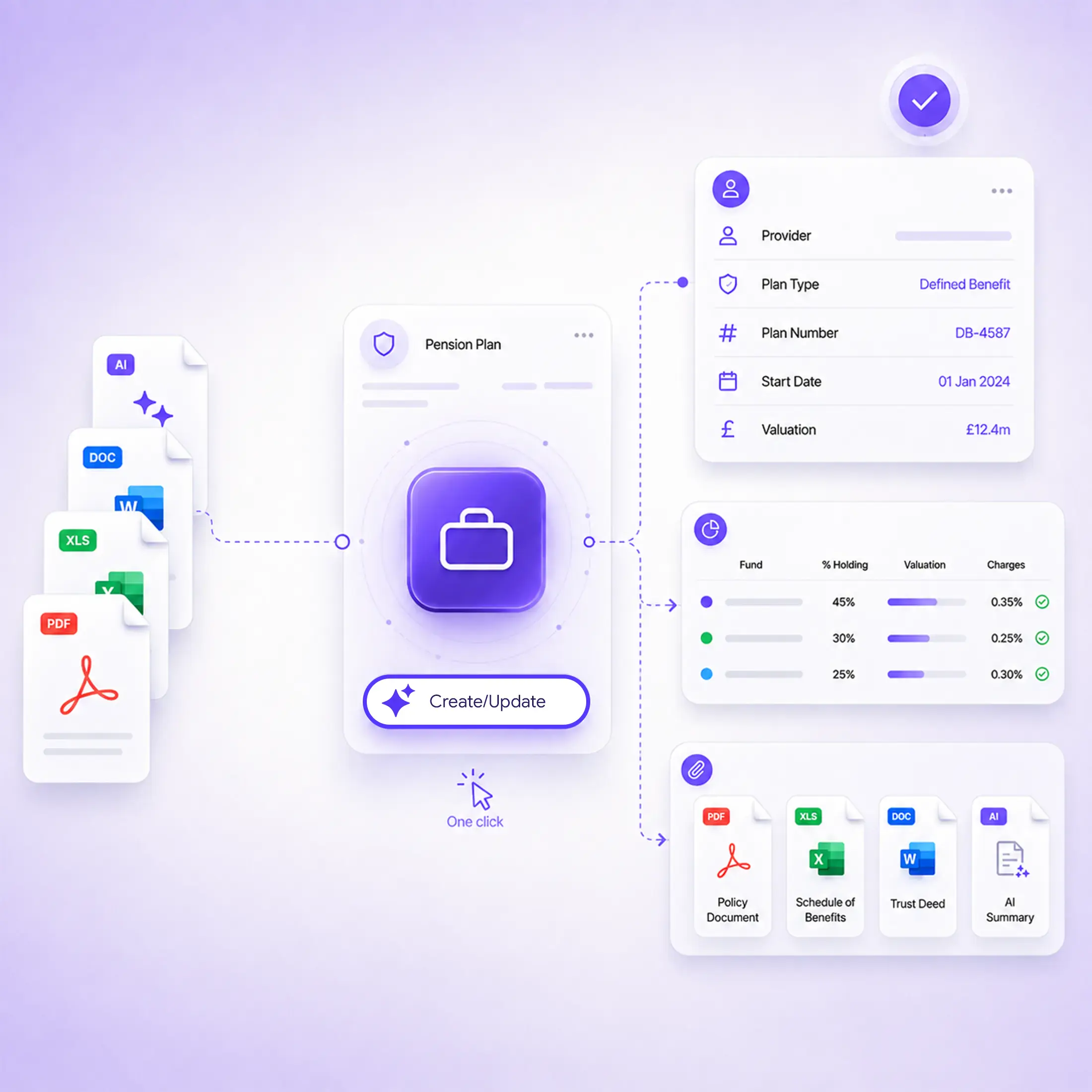
Push captured plan information into Intelliflo as a new plan, or update an existing one, depending on where the case sits.
02
Detailed Fund Holdings and Charges
Fund holdings, charges, valuations and contribution histories move across with the plan record.
03
Policy Documents and AI Summary Included
Policy documents and a summary sheet populated by 4admin's AI stay with the plan record.
What Gets Pushed into Intelliflo
Once the provider information has been captured and confirmed in 4admin, your team can use Create a Plan or Update a Plan to move detailed plan information into Intelliflo.
Plan Details
Documents
Valuations
Plan Details
Provider name
Plan type and plan number
Start date and valuations
Documents
Policy documents
Product information and transaction histories
Summary sheet populated by 4admin's AI
Valuations
Fund holdings
Charges
Contribution histories and more
Process Flow
From Signed LOA to Intelliflo Record
4admin handles the provider workflow, analyses the information that comes back and structures the plan data before it reaches Intelliflo.
Submit LOA
→
4admin Analyses the Pack
→
Chase Missing Information
→
Push to Intelliflo
Why 4admin & Intelliflo Integration Matters
The plan information collected during an LOA is often the same information advisers and paraplanners need when they start working on the case in Intelliflo.
Rebuilding Plan Records by Hand
Without the integration, your team works through the provider pack again to build out the Intelliflo plan record. Plan data ends up only partly entered, entered later, or missed altogether. Every re-keyed field is another opportunity for a transcription error.
Plan Data Arrives Complete
The integration goes beyond the headline plan details, carrying fund holdings, charges and contribution histories into Intelliflo too. Policy documents and the 4admin summary sheet move across with the structured data, keeping the supporting information with the plan record.
Security and Compliance
Permissions
The 4admin and Intelliflo integration supports the transfer of captured plan information and documents into Intelliflo as part of your firm's existing workflow.
Data Handling
Data is encrypted in transit and at rest, hosted on UK Microsoft Azure infrastructure.
Security Certifications
4admin holds SOC 2 Type II certification and is ISO 27001 certified. Full detail is available on our security page.
Explore More Integrations
Connect 4admin with other tools across your advice workflow, so information captured during the LOA process can keep moving without unnecessary manual entry.
What data moves from 4admin into Intelliflo?
4admin pushes policy documents, an AI-generated summary sheet, provider and plan details, start dates, valuations, fund holdings, charges, and contribution histories directly onto the Intelliflo record.
Can we update an existing plan or only create new ones?
Both. At the click of a button you can either create a new plan or update an existing one, depending on where the case sits in Intelliflo.
Does this replace how our team uses Intelliflo?
No. Your team continues working in Intelliflo exactly as they do today. The integration simply fills in the plan data automatically, rather than leaving it to be typed in by hand.
Where does the data come from before it reaches Intelliflo?
It comes from the provider pack 4admin receives during the LOA process. 4admin's AI extracts and structures the data first, then pushes it across in a clean, consistent format.
How accurate is the data that lands in Intelliflo?
The data is extracted directly from the provider pack, so it matches the source document. Removing manual re-keying also removes the transcription errors that come with it.