
Back-office delays typically build through dozens of small interruptions: checking another inbox, logging into another portal, finding the latest spreadsheet and re-entering data into the CRM.
For many advice firms, this problem has become part of everyday operations. Client information, provider updates, documents, tasks and policy data are often split across multiple software systems that do not communicate properly.
The result is slower case progression, more manual handovers, weaker operational visibility and extra work for administrators and advisers.
This blog helps you understand why scattered back-office systems cause delays, where information flow breaks down, and how connected workflows can help firms move work forward faster.
What Are Scattered Systems in the Back Office?
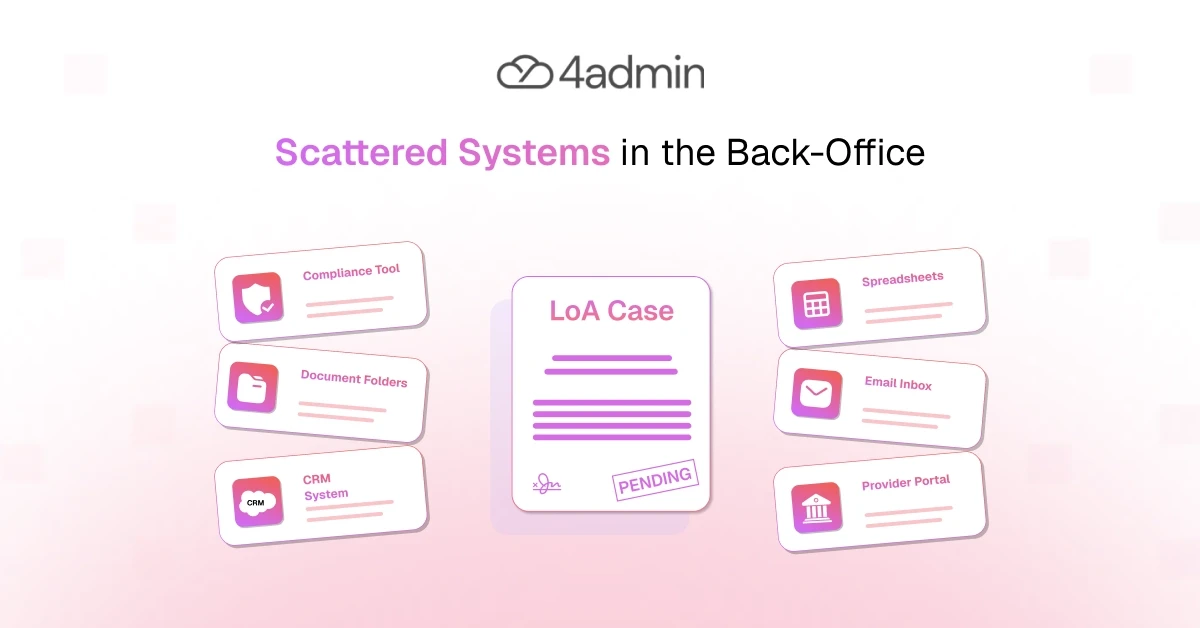
Scattered systems are tools, platforms, inboxes and records that hold related information but do not share it consistently.
In an advice firm, this can mean:
Client and case data in the CRM
Provider updates in emails or portals
Tasks in spreadsheets or personal inboxes
Provider packs in document storage
Policy data across several records
Compliance evidence saved separately
Using multiple software systems is not necessarily inefficient. Firms need specialist tools for planning, CRM, document storage and provider access. The difference is whether back-office integrations connect them into a working tech stack.
When information is fragmented across multiple systems, staff must bridge the gaps manually. Having more software does not automatically create a better workflow.
How Scattered Systems Create Back-Office Delays in Advice Firms
Here are the five ways scattered systems create bottlenecks in an advice firm's back office:
1. Manual Data Silos, Re-keying and Reconciliation
Data silos form when client details, provider updates, policy information and case notes are stored separately.
Staff may copy information from a provider portal into a spreadsheet, enter it again in the CRM, and then compare it with an email or provider pack. This creates:
Duplicate data entry
Conflicting records
Extra checking
Typing errors
Time-consuming corrections
Without system integration or reliable data synchronisation, staff spend time reconciling information instead of progressing the case.
2. The Context-Switching Penalty and Login Fatigue
One case may require staff to move between platforms, screens, scattered inboxes, documents and provider portals.
Every login, search and interface change forces them to rebuild the case context. Each delay may appear small, but across hundreds of cases it reduces productivity and increases frustration.
3. The Handover Trap and Communication Gaps
In fragmented workflows, a case passes between administrators, advisers, paraplanners, operations teams and compliance staff.
One person requests information, another checks it, and someone else updates the record. Every handover creates a point where information can be lost, misunderstood, duplicated or left waiting.
Without connected systems, teams rely on messages and manual updates to maintain workflow continuity.
4. Lack of Real-Time, Centralised Visibility
Disconnected systems make it difficult to see the latest case status, owner, missing information, workload and next action in one place.
Different employees may rely on different spreadsheets, CRM records, reports or email chains. This weakens operational visibility and leads to missed actions, unclear priorities, uneven workloads and repeated status checks.
5. Delayed Decision-Making
Managers cannot make timely decisions when information is outdated, incomplete or spread across several tools.
Waiting for records to be gathered and reconciled can cause:
Longer turnaround times
Missed provider service standards
Growing backlogs
Weak capacity planning
Poorer operational control
Where Advice Firm Information Becomes Fragmented
Here are the most common places information gets scattered across an advice firm with disconnected business systems:
Client and Case Data in the CRM
The CRM may hold the core client record but not the latest provider response, document or task update.
Provider Updates in Emails and Portals
Responses may arrive through shared inboxes, individual inboxes or separate provider portals.
Tasks Managed Through Spreadsheets and Inboxes
Chasers, deadlines and outstanding actions may sit outside the main case record.
Provider Packs and Documents Stored Separately
Provider packs may be downloaded, renamed, saved and reviewed in another folder or platform.
Policy Data Held Across Different Records
Policy data may appear in a provider pack, CRM, spreadsheet and planning tool, with no guarantee that each version matches.
This fragmented provider data creates gaps in the case history. Staff must search scattered emails, scattered inboxes, portals, spreadsheets and internal systems before work can progress.
What Does a Typical Scattered Back-Office Workflow Look Like?
Consider a transfer or provider-pack case:
A client instruction is recorded in the CRM.
The provider response arrives by email.
The task is tracked in a spreadsheet.
The provider pack is stored elsewhere.
Missing information is discussed in an inbox.
Policy data is manually entered into the CRM.
Someone must check every location before the case can move forward. No individual task is especially difficult. The delay comes from searching, checking, switching systems and coordinating the steps.
How Does This Typical Scattered Back-Office Workflow Affect Your Advice Firm?
Here's how fragmented workflows affect an advice firm:
Aspect | Impact on the Firm |
Slower LOA and transfer case progression | Scattered systems make provider chasers, responses and next actions easier to miss. A case may wait even after the provider has replied. |
Longer provider-pack processing | Staff must locate documents, compare records, identify missing information and manually structure fragmented provider data. |
More errors and rework | Duplicate data entry and inconsistent records create repeated checks, corrections and avoidable rework. |
Missed service standards and longer turnaround times | Small delays at each stage accumulate across the full workflow. |
Higher back-office costs | Skilled staff spend time bridging gaps between systems rather than completing higher-value work. |
Adviser and employee frustration | Advisers may become involved in status checking, chasing and administrative follow-up because there is no clear operational view. |
Poorer client experience | Clients feel the impact through slower onboarding, transfers, reviews and updates. |
Why Scattered Back-Office Systems Create Compliance Risk
Case notes, provider communications, documents, decisions and source information may be spread across several systems.
During a file check, complaint or review, the firm may struggle to show:
Who completed an action
What happened and when
What information was received
What remained missing
Where a figure or decision came from
Scattered evidence weakens audit trails and makes it harder to reconstruct the case. Operational evidence must remain connected to the advice record.
How Connected Systems Reduce Back-Office Delays
Here's how connected systems reduce the delays caused by a scattered back office:
Key Aspect | How It Helps |
CRM integration | CRM integration allows structured client, policy and case data to move into the CRM with less re-keying. |
API integration | Where available, API integration supports more consistent information flow between systems. |
Process automation | Process automation reduces repetitive checks, routine updates and manual handovers. |
Data synchronisation | Synchronised data creates fewer gaps in records and reduces conflicting versions. |
Centralised operational visibility | Connected systems give teams a clearer view of case status, ownership, missing information and next actions. |
A more reliable source of case information | Not every piece of data needs to sit in one platform. Firms need a reliable operational view that acts as a single source for the current case position. |
Why Advice Firms Need a Workflow Layer
A workflow layer for financial advisers connects work across provider portals, emails, documents, CRMs and internal teams.
Rather than replacing existing tools, it supports existing tech stack integration by coordinating information and actions between them. This creates:
Better workflow continuity
Cleaner policy data flows
Fewer manual handovers
More connected systems
Stronger operational visibility
Fewer gaps in records
How 4admin Connects Scattered Back-Office Workflows
4admin supports LOA, transfer and provider-pack workflows across an advice firm's existing systems.
It helps with:
Provider chasing and case tracking
Provider-pack collection and processing
Missing-information checks
Structured data extraction
CRM-ready policy data
Clearer case ownership and status
Consistent operational audit trails
4admin acts as a workflow layer rather than requiring a full system replacement. It connects work between providers, documents, emails, internal teams and the CRM. Because it runs inside the firm's own Microsoft 365 environment, it isn't another system to log into - provider email stays where the team already works.
This means fewer manual handovers, fewer gaps in records, cleaner policy data flows and better operational visibility.
Conclusion
Back-office delays are not always caused by limited staff capacity or slow providers. They are often created by disconnected business systems, context switching, duplicate entry, manual handovers, fragmented evidence and weak visibility.
Scattered systems do not just make work harder. They make work wait.
By improving system integration, information flow and workflow continuity, advice firms can increase capacity without adding the same level of administrative workload.
Managing documents, workflows, and task ownership across multiple systems often leads to delays and duplicated effort. 4admin's Back Office Automation for Financial Services centralises operations and helps teams work more efficiently at scale.
Book a free call for a personalised demonstration of the platform.
Frequently Asked Questions
Do advice firms need to replace their entire tech stack?
No. Firms may still need specialist tools for CRM, planning, document storage and provider access. The issue is whether work can move between them without repeated manual intervention.
How can I tell if my firm's back office is suffering from scattered systems?
If staff regularly jump between CRM, email, spreadsheets and provider portals just to update one case, your back office is running on scattered systems.
What are the signs of manual data silos and re-keying in our workflows?
You'll see the same client or policy details typed into multiple places, frequent "which version is correct?" conversations, and time lost reconciling mismatched records.
What workflows should we automate first to reduce back-office bottlenecks?
Start with the high-volume, repeatable flows: LOA and transfer chasing, provider-pack collection and data extraction, and routine CRM updates from provider responses.
Ready to automate your admin processes?
Learn how you can reduce admin backlog, ensure compliance, and increase capacity.