
The biggest technology decision an advice firm makes is no longer about which tool to buy. It’s about how the entire technology stack should be built.
A firm’s growth and reliance on technology go hand-in-hand, as they increasingly rely on their tech stack to manage client data, workflows, reporting, and automation. As operations continue to expand, a key architectural question surfaces: Should everything run inside one system, or should specialised tools handle specific workflows through integrations?
This is where the best-of-breed tools vs all-in-one platform debate comes in.
This blog explores the differences between best-of-breed and all-in-one platforms, their pros and cons, and how advice firms can design an integrated tech stack for advisers that supports long-term operational growth.
Quick Practical Comparison: Best of Breed vs All-in-One Platforms
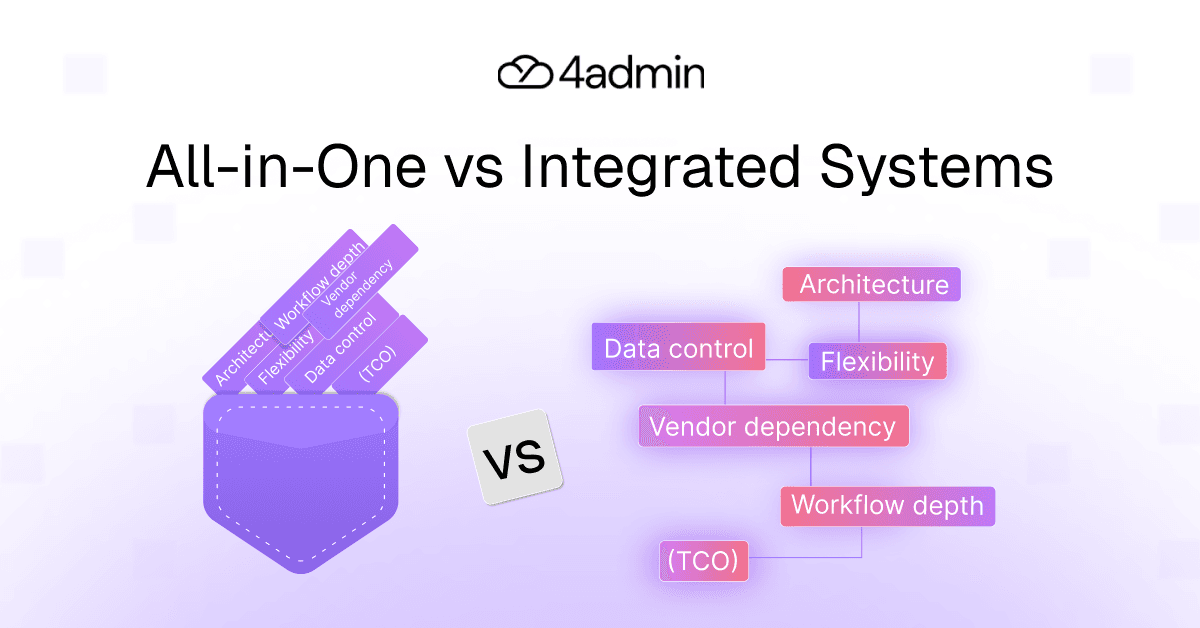
Before exploring best of breed vs all in one approaches in depth, here is a quick snapshot placing them side to side that helps compare them at a high level:
Aspect | All-in-One Advice Systems | Integrated Best-of-Breed Tools |
Architecture | Single platform providing most functionality | Multiple specialised tools connected through integrations |
Flexibility | Limited to vendor roadmap | Tools can be swapped or upgraded individually |
Vendor dependency | Higher single vendor risk | Lower vendor dependency across the stack |
Data control | Data concentrated inside one platform | Greater data ownership across systems |
Integration complexity | Minimal integrations required | Requires reliable API connectors and integration governance |
Workflow depth | Generalised workflows | Specialised tools can support deeper operational workflows |
Total Cost of Ownership (TCO) | Simpler initially | May require more architectural planning |
The difference often comes down to composable architecture vs suite-based systems.
In a suite model, most capabilities sit inside a single platform. In a composable stack, specialised tools work together through integrations.
All-in-One Advice Systems: The "Monolith" Approach
All-in-one advice systems aim to bring multiple capabilities into one platform managed by a single vendor. These systems attempt to centralise most operational processes so teams can work within a single environment.
Typical functions within an all-in-one platform include:
client management and data storage
financial planning tools
reporting and analytics
document management
workflow tracking
client portals
The core idea is convenience. By combining all systems into one platform, firms can manage operations via a single interface. Thus, reducing the need for integrations.
Pros of All-in-One Systems
Simplicity and convenience
Teams operate within one system, often using a single login and consistent interface. This can simplify day-to-day operations, particularly for smaller firms.
Unified data environment
Because modules share a central database, data synchronisation is straightforward. Firms do not need to manage multiple systems exchanging data through integrations.
Faster implementation
Deploying a single platform is generally faster than assembling a stack of integrated tools. This makes implementation timelines shorter and onboarding new staff simpler.
Simpler training
Staff only need to learn one platform rather than navigating multiple tools with different interfaces and workflows.
Reduced vendor management
Managing fewer vendors can reduce administrative overhead. Contracts, service agreements, and vendor relationships are centralised within one provider.
Cons of All-in-One Systems
Despite their convenience, all-in-one platforms come with certain limitations as firms grow.
Vendor lock-in risk
When data, workflows and operational processes depend on a single platform, switching systems later becomes difficult. This vendor lock-in can create long-term dependency on one provider.
Limited workflow flexibility
Advice firms often develop unique operational processes over time. If an all-in-one platform cannot support those workflows deeply, teams may need to change or create workarounds.
Dependence on the vendor’s roadmap
All feature development depends on the provider’s priorities. Firms cannot independently adopt new tools if the platform does not support them.
Operational risk from centralisation
Firms may face single vendor risk through its decision to consolidate all workflows into a single system. The platform operates multiple processes that might be impacted by any security issues, outages or strategic shifts that occur.
Similarly, the concentration of operational data and processes in regulated environments raises data ownership and system control concerns for companies which operate in those sectors.
Integrated Tools: The "Best-of-Breed" Approach
An alternative approach is to build an integrated best-of-breed technology stack.
Here, firms use multiple tools which provide specialised solutions aimed at solving different operational problems. The systems establish connectivity through API connectors or Data Lake integrations that enable data transfer between various platforms.
Typical components of an integrated tech stack for advisers might include:
CRM or back-office system
financial planning software
workflow automation tools
document processing platforms
client onboarding tools
Each tool is selected because it performs a specific function exceptionally well.
This approach is often described as a composable stack, where systems are modular and can evolve independently.
Pros of Integrated Best-of-Breed Tools
Specialised functionality
Each tool focuses on solving a specific operational problem. As a result, specialist tools often deliver deeper features and better workflow depth than suite modules.
Greater flexibility
Firms can select tools that match their exact operational processes rather than adapting workflows to fit a single platform.
Scalability
As firms grow, individual tools can be replaced or upgraded without rebuilding the entire technology stack.
Reduced vendor dependency
By distributing capabilities across multiple providers, firms reduce single vendor risk. No single platform controls the entire operational environment.
Better workflow optimisation
Specialist tools often automate complex processes more effectively, particularly when dealing with document processing, provider data, or workflow automation.
Cons of Integrated Tool Stacks
While integrated stacks offer flexibility, they introduce their own challenges.
Integration complexity
Connecting multiple systems requires careful planning. Firms must rely on stable API connectors and maintain consistent data flows between systems.
Data synchronisation challenges
If integrations are poorly designed, firms may experience fragmented data or reconciliation issues between platforms.
More vendors to manage
An integrated stack involves relationships with multiple technology providers. This increases vendor management responsibilities.
Implementation effort
Building a well-designed stack can take longer than deploying a single system. Firms must invest in integration governance to ensure systems communicate reliably.
Total cost considerations
Evaluating the total cost of ownership (TCO) across several tools plays an important factor when a firm is not following a single platform subscription approach.
Despite these challenges, firms are finding greater flexibility in using a composable architecture as operational demands increase.
A New Version of the All-in-One Idea: AI “Operating Systems”
A newer trend in technology vendors is the idea of AI-driven operating systems for financial services firms.
These platforms promise to automate large portions of an advice firm’s operations by acting as a central control layer for workflows, data processing, and automation.
In many ways, this concept represents a modern version of the all-in-one platform model.
While these systems may offer advanced automation capabilities, they introduce similar structural concerns:
concentration of operational data within one vendor
limited flexibility to integrate specialist tools
reliance on a single technology roadmap.
Financial advice firms that operate under regulatory restrictions need to maintain control over their technology systems and data ownership rights. The use of a single AI platform to carry out business operations creates the same vendor lock-in problems which arise from traditional enterprise software suites.
Why Many Advice Firms Move Toward Integrating Best-of-Breed Tools
As advice firms grow, operational complexity increases. Processes become more specialised, provider relationships expand, and workflows evolve beyond the capabilities of general-purpose systems.
When evaluating best of breed vs all-in-one platforms, many firms eventually move toward integrated architectures for several reasons.
Integrated stacks allow firms to:
> adopt specialised tools that solve operational problems deeply,
> evolve their technology stack without replacing core systems,
> maintain flexibility as technology changes, and
> avoid relying entirely on a single provider for all operational processes.
Instead of forcing every workflow into one platform, firms combine strong core systems with specialised automation tools.
This approach allows firms to build an integrated tech stack for advisers that balances flexibility, control, and operational depth.
Practical Choice Guide: How to Decide Which Approach Fits Your Firm
The right architecture often depends on your firm's size, operational complexity, and technology priorities.
Firms should evaluate the following factors before deciding between an all-in-one system or a best-of-breed stack.
Key Considerations for Decision-Making:
Aspect | Considerations |
Complexity of Your Needs | Firms with simple, standardised workflows may benefit from consolidated platforms, while complex operations often require specialised tools. |
Implementation Capacity | Smaller teams may prefer systems that are faster to deploy and easier to manage, while larger teams may have the resources to implement and maintain multiple integrated tools. |
Data Flow Requirements | If your processes require data to move between multiple providers or departments, integration capabilities become a critical factor. |
Growth Strategy | Firms expecting rapid operational growth may prioritise flexibility and scalability over immediate simplicity. |
All-in-One Systems May Be a Better Fit If:
your firm is small or early-stage
you prioritise speed of implementation
workflows are relatively standardised
you want to minimise vendor management
simplicity matters more than customisation.
Integrated Best-of-Breed Tools May Be a Better Fit If:
your firm handles higher operational volumes
workflows involve multiple providers and complex processes
you want deeper automation for specific tasks
you prefer flexibility to upgrade individual tools
your priority is to reduce vendor lock-in risks.
In practice, many firms adopt a hybrid approach over time.
They maintain strong core systems while gradually integrating specialist tools to optimise specific workflows.
Where Workflow Automation Platforms Fit
Many operational tasks in advice firms occur between systems rather than inside a single platform.
Examples include:
provider communications
document processing
data extraction
LoA handling
updating CRM records.
These workflows often involve manual processing and repeated data entry. As a result, they can become operational bottlenecks.
Specialised automation platforms can integrate with existing systems through API connectors, helping firms automate tasks without replacing their core platforms.
How Platforms Like 4admin Support Integrated Technology Stacks
4admin is designed to support an integrated best-of-breed architecture rather than replacing your existing systems.
Instead of acting as a full platform suite, 4admin focuses on automating specific operational workflows, including:
LoA processing
tracking and chasing
provider data gathering
data extraction
Ssystem updates
By connecting to your existing CRM and back-office systems, it helps firms automate administrative work while preserving their existing technology stack.
This allows advice firms like yours to strengthen their operational processes without introducing unnecessary vendor lock-in or replacing core platforms.
Conclusion: Technology Architecture Should Support Operational Depth
There is no universal winner in the best-of-breed vs all-in-one debate. The right choice depends on how a firm operates, how quickly it plans to scale, and how much flexibility it needs as technology evolves.
However, for many modern advice firms, building an integrated tech stack that balances core platforms with specialised tools offers the most sustainable path forward.
That’s where 4admin fits in. By automating key workflows such as LoA processing, provider data analysis, and systems updating, we integrate with your existing systems to streamline operations without replacing your core platforms.
If you're looking to build an integrated tech stack for your firm where integration governance and workflow depth stay uncompromised, see how 4admin can help you build a more efficient, scalable advice tech stack.
FAQs
Are all-in-one systems better for scaling businesses?
No, integrated tools often outperform all-in-one systems for scaling businesses due to greater flexibility and customisation.
What are examples of integrated tools in practice?
For example, Zapier connecting Slack, Trello, and Google Workspace exemplifies integrated tools automating workflows across apps.
How do costs compare between all-in-one systems and integrated tools?
All-in-one systems feature predictable subscription fees, while integrated tools can incur higher costs from multiple licenses and API fees.
What are best practices for integrating tools effectively?
Best practices include prioritizing API compatibility, conducting regular audits, and using middleware like MuleSoft if possible to ensure seamless integrations.
Ready to automate your admin processes?
Learn how you can reduce admin backlog, ensure compliance, and increase capacity.